Showing posts with label android. Show all posts

Friday, September 6, 2013

How to make a call for last outgoing casll from application

String dialNumber = CallLog.Calls.getLastOutgoingCall(getApplicationContext());
if (dialNumber != "") {
    dialNumber = "tel:"+dialNumber;
    Intent dial = new Intent();
    dial.setAction("android.intent.action.CALL");
    dial.setData(Uri.parse(dialNumber));
    dial.addFlags(Intent.FLAG_ACTIVITY_NEW_TASK | Intent.FLAG_ACTIVITY_CLEAR_TOP);
    startActivity(dial);
} else {
    Log.e(TAG, "no last outgoing call");
}

Thursday, August 29, 2013

How to get the package name and intent of installed apps

PackageManager pm = getPackageManager();
List<ApplicationInfo>packages = m.getInstalledApplications(PackageManager.GET_META_DATA);
for (ApplicationInfo packageInfo : packages) {
Log.d(TAG, "Installed package :" + packageInfo.packageName);
Log.d(TAG, "Launch Activity :" + pm.getLaunchIntentForPackage(packageInfo.packageName));
}

Reference:
How to launch another app from your app.
http://qtcstation.com/2011/02/how-to-launch-another-app-from-your-app/

Saturday, January 19, 2013

Sharing the application development experience part 2

1. Framework will give you the exception unexpected.
In http://developer.android.com, it mentioned that if you use some APIs, it may throws exception, developer should noticed that catch this exception properly. However, framework will sometimes throw the exception unexpected, developer should also take care about this. In normal use case, you may not meet this problem, but once the system is going to busy and trigger some memory killer event. The best way to avoid such problem, you should look into the source code of APIs that you used in the app. It will make your app more robust and stable.

2. Handle click event carefully.
In your app, you may use different button in the same activity and you know you should handle these click event. But you may not know sometimes, the event is not come one by one. If one click event will make some other click event go into invalid state, you should take care about it. For example, if you want to handle click event one by one, you should have the mechanism to avoid the multiple click event come

simultaneously.


3. Take care of dialog
Dialog needs the context object to show or dismss. If your app may use this dialog in backgorund, you should make sure the context is really existed or not, otherwise user may meet force close issue. Actually, the best way is that you should take care of the dialog by different activity life cycle.

Monday, August 6, 2012

how to catch the dialog dismiss

It is a very simple example and I just want to put here because many AlertDialog example doesn't mention this.

AlertDialog al = new AlertDialog.Builder(this)
.setTitle("Title")
.setSingleChoiceItems(adapter, 0, new DialogInterface.OnClickListener() {
    public void onClick(DialogInterface dialog, int whichButton) {
        //do something when pressing the list item.
    }
})
.setPositiveButton("Done", new DialogInterface.OnClickListener() {
    public void onClick(DialogInterface dialog, int whichButton) {
        //do something when pressing the Done button.
    }
}).create();
al.show();
al.setOnDismissListener(new OnDismissListener() {          
    @Override
    public void onDismiss(DialogInterface dialog) {
      //do something when the dialog dismiss.
    }
});

Tuesday, May 22, 2012

Sharing the application development experience


Create the application is very easy but create the excellent application is not easy. I want to share the experience for you. If you have any question or other experience you want to share with us, please reply here.

  1. You must understand the usage of the API if you want to use.
    1. At least you should know why you use this API.
    2. If you are in the activity, you must understand the life cycle of activity.
    3. If you are in the service, you must understand the life cycle of service.
    4. If you can not understand the explain from Android official website, you should directly check the source code of framework.
  2. You must consider the ANR problem.
    1. You can refer to http://developer.android.com/guide/practices/design/responsiveness.html.
    2. If you want to do any operation that may consume much time, you must consider it and don’t just do it in main thread.
  3. You can use log more smart.
    1. You should use the flag to control your log.
    2. Log level is very useful.
    3. Just need to show the key log in the shipped software.
  4. You must remove unnecessary code of this application.
    1. Same as item 1, if you don’t understand what you do, the best solution is DON’T USE IT.

Friday, September 2, 2011

How to sign apk

java -jar out/host/linux-x86/framework/signapk.jar build/target/product/security/platform.x509.pem build/target/product/security/platform.pk8 Test.apk.unsigned Test.apk

Thursday, March 17, 2011

Get Android source code in M$ Windows

(Updated in 20110317)
Link to http://code.google.com/p/msysgit/

Download the Git application as below red rectangle.
git

Keep pressing next to install Git. (Very easy!!)
Execute Git by Git bash
Create a directory to get the Android source code and copy "autogit.sh" to android_source folder
cd /c
mkdir android_source
cd android_source
sh autogit.sh

(Need about 13.7 GB)

autogit.sh is created by me and reference by http://android.git.kernel.org/?a=project_index
There are 163 projects in Android open source project.
If the structure of this project is modified, please tell me to modify autogit.sh.

Reference:
如何在 Windows 平台上下載 Android 的原始碼?

Friday, February 18, 2011

grep

-i, --ignore-case
Ignore case distinctions in both the PATTERN and the input files. (-i is specified by POSIX.)


-R, -r, --recursive
Read all files under each directory, recursively; this is equivalent to the -d recurse option.


-v, --invert-match
Invert the sense of matching, to select non-matching lines. (-v is specified by POSIX.)


-w, --word-regexp
Select only those lines containing matches that form whole words. The test is that the matching substring must either be at the beginning of the line, or preceded by a non-word constituent character. Similarly, it must be either at the end of the line or followed by a non-word constituent character. Word-constituent characters are letters, digits, and the underscore.


-A NUM,--after-context=NUM
Print NUM lines of trailing context after matching lines. Places a line containing a group separator (--) between contiguous groups of matches. With the -o or --only-matching option, this has no effect and a warning is given.

-C [NUM], -NUM, --context[=NUM] 
Print NUM lines of output context. Places a line containing a group separator (--) between contiguous groups of matches. With the -o or --only-matching option, this has no effect and a warning is given.

Wednesday, January 12, 2011

git

git diff
find the different between local and server.

git diff .
find the different between . and server.

git reset --hard
all the changes are lost.

git reset --hard HEAD~2
reset to previous 2 commit

git reset --hard
reset to commit-id

git pull
sync code

git branch -f
change branch

git checkout
check out

Monday, August 9, 2010

Check if SD card storage is available

public static boolean hasStorage(boolean requireWriteAccess) {
String state = Environment.getExternalStorageState();

if (Environment.MEDIA_MOUNTED.equals(state)) {
return true;
} else if (!requireWriteAccess
&& Environment.MEDIA_MOUNTED_READ_ONLY.equals(state)) {
return true;
}
return false;
}


Reference:
Android: Check if SD card storage is available

Tuesday, July 27, 2010

check if any network connected

private boolean checkIfNetworkConnected() {
  boolean result = false;
  ConnectivityManager connManager = (ConnectivityManager) getSystemService(Context.CONNECTIVITY_SERVICE);
  NetworkInfo info=connManager.getActiveNetworkInfo();
  if (info == null || !info.isConnected()) {
    result = false;
  } else {
    if (!info.isAvailable()) {
      result =false;
    } else {
      result = true;
    }
  }

  return result;
}

Reference:
Android 偵測網路是否連線

Wednesday, September 30, 2009

make sdk fail about DroidDoc


$ sudo apt-get install sun-java5-jdk
$ cd /etc/alternatives
$ sudo rm javadoc.1.gz
$ sudo ln -s /usr/lib/jvm/java-1.5.0-sun/man/man1/javadoc.1.gz javadoc.1.gz
$ sudo rm javadoc
$ sudo ln -s /usr/lib/jvm/java-1.5.0-sun/bin/javadoc javadoc


Reference:
編譯Android cupcake SDK

Tuesday, September 22, 2009

how to remove ^M in vi

:1,$s/^M//g

^M: Ctrl+V, and press Enter

[2014/05/30 updated]
It seems dos2unix is better than this command.

dos2unix – Removing Hidden Windows Characters from Files
http://www.liquidweb.com/kb/dos2unix-removing-hidden-windows-characters-from-files/

Sunday, September 20, 2009

Get and build source code in Cygwin

You should install Java 5 on your computer first!!
Add the path of javac.exe to $PATH.

Download cygwin from http://cygwin.com/setup.exe

Choose A Download Site: You can choose many Taiwan sites. 

Select Packages:( Select Binary )

Press 'View' to Not Installed

Bison: A parser generator that is compatible with YACC
Curl: Command line tool for tranferring files with HTTP, HTTPS, FTP, etc.
Flex: A fast lexical analyzer generator
Gcc: C compiler upgrade helper
Git: Fast version control system - core files
Gperf: Perfect hash function generator
Libncurses-devel: Libraries for terminal handling (development)
Make: The GNU version of the 'make' utility
Python: An interactive object-oriented scripting language
Vim: Vi IMproved - enhanced vi editor
Wget: Utility to retrieve files from the WWW via HTTP and FTP
Zip: The zlib compression and decompression library

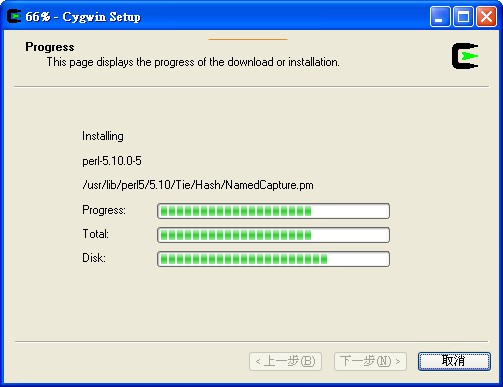
Installing as below picture

[caption id="attachment_73" align="alignnone" width="450" caption="Installing Cygwin"]Installing Cygwin[/caption]

/*
create a directory to store some source code
mkdir src
cd src

Install libsdl (http://www.libsdl.org/) not libsdl-dev as Android open project mentioned
wget http://www.libsdl.org/release/SDL-1.2.13.tar.gz
tar -zxvf SDL-1.2.13.tar.gz
cd SDL-1.2.13
./configure
make
make install
if success, you can find SDL.dll in /usr/local/bin

Install libwxgtk2.6-dev
Download "libwxgtk2.6-devel-2.6.4-14mdv2008.1.i586.rpm" from http://rpmfind.net/linux/rpm2html/search.php?query=libwxgtk-devel
Copy it to ~/src
*/

Install cyg-apt
cd /bin
wget http://www.lilypond.org/~janneke/software/cyg-apt
chmod a+rx cyg-apt
vi cyg-apt
1. root = '/cygwin' => root = '/'
2. downloads = root + '/var/cache..... => downloads = root + 'var/cache....
3. config = root + '/etc/setup' => config = root + 'etc/setup'
4. mirror = 'http://mirror.mcs.anl.gov/cygwin'
cyg-apt setup
cyg-apt update

Install some essential application
libsdl-dev
libesd0-dev
libwxgtk2.6-dev
valgrind
zlib1g-dev
libncurses5-dev
git-core gnupg

Reference:
1. Frequently Asked Questions about Java and Cygwin
2. apt for cygwin

Tuesday, July 7, 2009

Basic Concept of Android Application Components

Activity
An application may or may not have a User Interface. If it has a user interface, it will have one or more Activity.

Service
If an application is to have a long life cycle it should be put into a Service. For example a background data synchronization utility running continuously should be implemented as a Service.

BroadcastReceiver
Like Services, BroadcastReceivers do not have a User Interface. Of even more importance, the code running in the onReceive method of a BroadcastReceiver should make no assumptions about persistence or long-running operations. If the BroadcastReceiver requires more than a trivial amount of code execution, it is recommended that the code initiate a request to a Service to complete the requested functionality.

Content Provider
If an application manages data and needs to expose that data to other applications running in the Android environment, a ContentProvider should be implemented.


Reference:
Unlocking Android - A Developer's Guide

Sunday, July 5, 2009

Not useful Google API for Android application

Google Gears
Gears is an open source project that enables more powerful web applications, by adding new features to web browsers.

Google Coupon Feeds
Google coupon feeds enable businesses to provide coupon listings that will be included in Google search results.

Tuesday, June 23, 2009

Create a activity with no background

Insert android:theme="@android:style/Theme.Translucent.NoTitleBar" in application tag.

Thursday, March 26, 2009

Delete large number of file by 'find and rm'

find ./ -iname 'test-file-*' | xargs rm -rf

rm 有最大刪除檔案的限制,大概是 2 萬個,若超過會出現錯誤訊息。
The maximum file limitation of deletion one time about 20 thousand.

引用:使用 find 搭配 rm 刪除大量檔案

Wednesday, March 11, 2009

VSFTPD

sudo apt-get install vsftpd

sudo vi /etc/vsftpd.conf

1. anonymous_enable=NO

2. local_enable=YES

3. write_enable=YES

sudo /etc/init.d/vsftpd restart

Thursday, February 26, 2009

sqlite command in adb

Connect to a database:

adb shell

# sqlite3 data/data/com.google.android.providers.contacts/databases/contacts.db

sqlite3 data/data/com.google.android.providers.contacts/databases/contacts.db

SQLite version 3.5.0

Enter ".help" for instructions

List tables:

.table

Print some of the information from the tables:

.header on

.mode column

sqlite> .header on

.header on

sqlite> .mode column

.mode column

sqlite> select * from phones;

select * from phones;

_id         person      type        number        number_key    label

----------  ----------  ----------  ------------  ------------  ----------

1           1           1           +15085551212  21215558051+

2           1           0           +17815551212  21215551871+

3           1           2           +16175551212  21215557161+

.help can tell you more useful command.

LIKE Operator Example
SELECT * FROM Persons WHERE City LIKE 's%';